

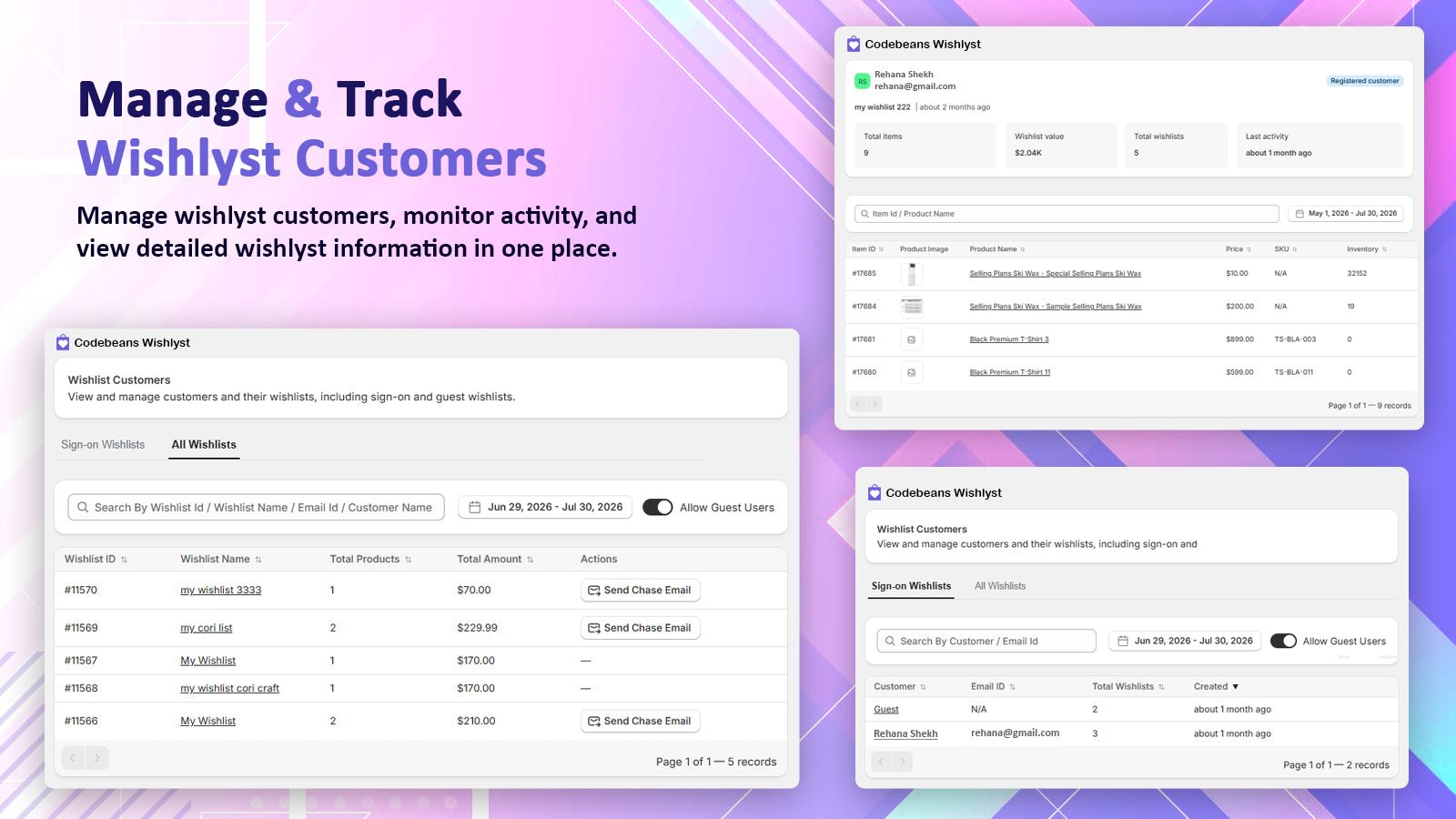
Customers: All Wishlists, Sign-on Wishlists and a customer's profile
Views
- Sign-on Wishlists
- All Wishlists
One row per customer: Customer, Email ID, Total Wishlists, Created. Click a customer to open their profile.
If names and emails show as unavailable, the app needs Shopify’s protected customer data access. Follow the Customer Data Access Required banner on the page.
Customer profile
Shows the customer’s email (or “No email — guest”), whether they are a Registered customer or a Guest session, their Total wishlists, Total items, Wishlist value and Last activity, plus a table of their wishlists. Open a wishlist to see each product’s image, name, price, SKU, inventory and the date it was added.Send a reminder email
Requires Manual Chase Emails in your plan.
Export
Click Export Customers, Export Wishlists or Export Excel and choose:Download
An Excel file with every wishlist item that matches your current search and filters, across all pages. Up to 10,000 rows.
Share With Email
The file is built in the background and emailed to the address you enter. No row limit. Use this for big exports.
Columns
Click Change under Columns in the file to pick columns. Your choice is saved for your store.
Select all ticks every column. Reset to default goes back to the 14 default columns.